Date Wheel
An iOS-style date picker sheet: three vertical carousels turn like wheels while a month calendar follows along.
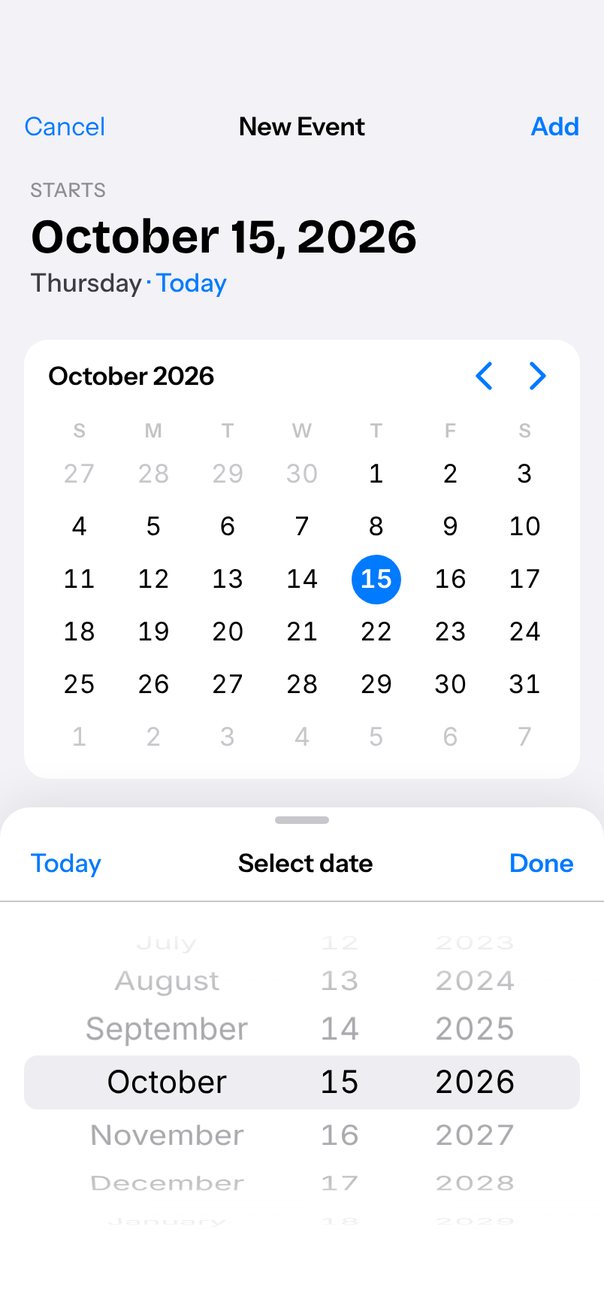
Live demo. Drag it, tap it.
How it works
- Three
orientation="vertical"carousels withitemSize36;itemAnimationsets rows 18° apart on a cylinder withtranslateY = R·sin θandrotateX = −θ. snapMode="nearest"withsnapMomentum0.25 handles flicks, and each wheel'sprogressupdates the header, calendar and dimmed days while it turns.onSnapToItemrolls February 30 back to the 28th withscrollTo({ index }); calendar taps and arrows drive the wheels withscrollTo,next()andprev().
Uses
Full source
import { SceneScreen, useScene } from "@/features/scenes/kit";
import { LinearGradient } from "expo-linear-gradient";
import * as React from "react";
import { Pressable, StyleSheet, Text, View } from "react-native";
import Animated, {
	interpolate,
	interpolateColor,
	type SharedValue,
	useAnimatedReaction,
	useAnimatedStyle,
	useDerivedValue,
	useSharedValue,
} from "react-native-reanimated";
import {
	Carousel,
	type CarouselItemAnimation,
	type CarouselRef,
} from "react-native-reanimated-carousel";
import Svg, { Path } from "react-native-svg";
import { scheduleOnRN } from "react-native-worklets";

const MONTHS =
	"January February March April May June July August September October November December".split(
		" ",
	);
const TODAY = new Date();
const YEARS = Array.from(
	{ length: 21 },
	(_, k) => TODAY.getFullYear() - 10 + k,
); // today ± 10
const DAYS = Array.from({ length: 31 }, (_, k) => k + 1);
const WEEKDAYS = ["S", "M", "T", "W", "T", "F", "S"];

type Selection = { m: number; d: number; y: number };
const START: Selection = {
	m: TODAY.getMonth(),
	d: TODAY.getDate(),
	y: TODAY.getFullYear(),
};

const BLUE = "#007AFF";
const ITEM = 36; // row height
const WHEEL_H = 216; // six rows, like UIDatePicker
const DEG = 18; // rows sit 18° apart on the cylinder
const RADIUS = ITEM / ((DEG * Math.PI) / 180);

const mod = (n: number, m: number) => {
	"worklet";
	return ((n % m) + m) % m;
};
const daysIn = (year: number, month: number) => {
	"worklet";
	const leap = (year % 4 === 0 && year % 100 !== 0) || year % 400 === 0;
	return month === 1 ? (leap ? 29 : 28) : 31 - ((month % 7) % 2);
};
const LINE = {
	fill: "none",
	strokeLinecap: "round",
	strokeLinejoin: "round",
} as const;

// Rows sit on a cylinder: R·sin θ places them, rotateX keeps them facing the axis.
const wheel: CarouselItemAnimation = (value) => {
	"worklet";
	const theta = Math.max(-90, Math.min(90, value * DEG));
	return {
		transform: [
			{ perspective: 500 },
			{
				translateY:
					(WHEEL_H - ITEM) / 2 + RADIUS * Math.sin((theta * Math.PI) / 180),
			},
			{ rotateX: `${-theta}deg` },
		],
		opacity:
			Math.abs(theta) >= 90
				? 0
				: interpolate(Math.abs(value), [0, 1, 4], [1, 0.75, 0.2], "clamp"),
	};
};

export default function Scene() {
	return (
		<SceneScreen
			background="#F2F2F7"
			statusBar="dark"
			fonts={[
				"Bricolage-Bold",
				"Instrument-Regular",
				"Instrument-Medium",
				"Instrument-SemiBold",
			]}
		>
			<NewEvent />
		</SceneScreen>
	);
}

function NewEvent() {
	const { width, height, insets } = useScene();
	const s = Math.min(width / 402, 1.05);

	const monthRef = React.useRef<CarouselRef>(null);
	const dayRef = React.useRef<CarouselRef>(null);
	const yearRef = React.useRef<CarouselRef>(null);
	const monthP = useSharedValue(START.m);
	const dayP = useSharedValue(START.d - 1);
	const yearP = useSharedValue(10);
	const [sel, setSel] = React.useState(START);

	// Live while the wheels turn: what the band shows right now, and how long that month is.
	const yearIndex = useDerivedValue(() =>
		Math.max(0, Math.min(YEARS.length - 1, Math.round(yearP.value))),
	);
	const monthDays = useDerivedValue(() =>
		daysIn(YEARS[yearIndex.value], mod(Math.round(monthP.value), 12)),
	);
	useAnimatedReaction(
		() => ({
			m: mod(Math.round(monthP.value), 12),
			d: mod(Math.round(dayP.value), 31) + 1,
			y: YEARS[yearIndex.value],
		}),
		(next, prev) => {
			if (!prev || next.m !== prev.m || next.d !== prev.d || next.y !== prev.y)
				scheduleOnRN(setSel, next);
		},
	);

	// February 30 does not exist: once the wheels settle, roll the day back to the month's last day.
	const clampDay = () => {
		const m = monthRef.current?.getCurrentIndex() ?? 0;
		const y = YEARS[yearRef.current?.getCurrentIndex() ?? 0];
		const d = (dayRef.current?.getCurrentIndex() ?? 0) + 1;
		if (d > daysIn(y, m)) dayRef.current?.scrollTo({ index: daysIn(y, m) - 1 });
	};

	const goToday = () => {
		monthRef.current?.scrollTo({ index: START.m });
		dayRef.current?.scrollTo({ index: START.d - 1 });
		yearRef.current?.scrollTo({ index: 10 });
	};

	const stepMonth = (step: "next" | "prev") => {
		monthRef.current?.[step]();
		// Paging past December (or back past January) turns the year wheel too.
		if (sel.m === (step === "next" ? 11 : 0)) yearRef.current?.[step]();
	};

	const day = Math.min(sel.d, daysIn(sel.y, sel.m));
	const date = new Date(sel.y, sel.m, day);

	// Fit the calendar rows between header and sheet; show the details list only if it fits too.
	const sheetH = 12 + 52 + WHEEL_H + 24 + insets.bottom;
	const free = height - insets.top - 44 - 104 - 16 - 82 - 16 - sheetH;
	const rowH = Math.max(28, Math.min(40, Math.floor(free / 6)));
	const showDetails = free - 6 * rowH >= 16 + 96;

	return (
		<View style={[styles.fill, { paddingTop: insets.top }]}>
			<View style={styles.nav}>
				<Text style={[styles.navButton, { fontSize: 17 * s }]}>Cancel</Text>
				<Text style={[styles.navTitle, { fontSize: 17 * s }]}>New Event</Text>
				<Text
					style={[
						styles.navButton,
						styles.bold,
						{ fontSize: 17 * s, textAlign: "right" },
					]}
				>
					Add
				</Text>
			</View>

			<View style={styles.header}>
				<Text style={[styles.kicker, { fontSize: 13 * s }]}>STARTS</Text>
				<Text
					style={[styles.bigDate, { fontSize: 32 * s, lineHeight: 40 * s }]}
				>
					{date.toLocaleDateString("en-US", {
						month: "long",
						day: "numeric",
						year: "numeric",
					})}
				</Text>
				<Text style={[styles.weekday, { fontSize: 17 * s }]}>
					{date.toLocaleDateString("en-US", { weekday: "long" })}
					<Text style={{ color: BLUE }}> · {relative(date)}</Text>
				</Text>
			</View>

			<MonthCard
				sel={{ ...sel, d: day }}
				rowH={rowH}
				s={s}
				onStep={stepMonth}
				onPick={(d) => dayRef.current?.scrollTo({ index: d - 1 })}
			/>

			{showDetails ? (
				<View style={[styles.group, styles.details]}>
					<DetailRow label="Repeat" value="Never" />
					<DetailRow label="Alert" value="1 day before" last />
				</View>
			) : null}

			{/* The picker sheet sits over the page, like a sheet presented at a small detent. */}
			<View style={[styles.sheet, { paddingBottom: insets.bottom + 12 }]}>
				<View style={[styles.grabber, { backgroundColor: "#C7C7CC" }]} />
				<View style={styles.toolbar}>
					<Pressable onPress={goToday} hitSlop={8}>
						<Text style={[styles.toolButton, { fontSize: 17 * s }]}>Today</Text>
					</Pressable>
					<Text style={[styles.toolTitle, { fontSize: 17 * s }]}>
						Select date
					</Text>
					<DoneButton s={s} />
				</View>
				<View style={styles.picker}>
					<View style={styles.band} />
					<Wheel
						wheelRef={monthRef}
						labels={MONTHS}
						width={150 * s}
						defaultIndex={START.m}
						progress={monthP}
						onSnap={clampDay}
						loop
					/>
					<Wheel
						wheelRef={dayRef}
						labels={DAYS}
						width={80 * s}
						defaultIndex={START.d - 1}
						progress={dayP}
						onSnap={clampDay}
						limit={monthDays}
						loop
					/>
					<Wheel
						wheelRef={yearRef}
						labels={YEARS}
						width={100 * s}
						defaultIndex={10}
						progress={yearP}
						onSnap={clampDay}
					/>
					<LinearGradient
						colors={["#fff", "#fff0"]}
						style={[styles.fade, { top: 0 }]}
					/>
					<LinearGradient
						colors={["#fff0", "#fff"]}
						style={[styles.fade, { bottom: 0 }]}
					/>
				</View>
			</View>
		</View>
	);
}

function relative(date: Date) {
	const start = new Date(
		TODAY.getFullYear(),
		TODAY.getMonth(),
		TODAY.getDate(),
	);
	const days = Math.round((date.getTime() - start.getTime()) / 86400000);
	if (days === 0) return "Today";
	if (days === 1) return "Tomorrow";
	if (days === -1) return "Yesterday";
	const [n, unit] =
		Math.abs(days) < 31
			? [Math.abs(days), "day"]
			: Math.abs(days) < 365
				? [Math.round(Math.abs(days) / 30.44), "month"]
				: [Math.round(Math.abs(days) / 365.25), "year"];
	const span = `${n} ${unit}${n === 1 ? "" : "s"}`;
	return days > 0 ? `In ${span}` : `${span} ago`;
}

type WheelProps = {
	wheelRef: React.RefObject<CarouselRef | null>;
	labels: (string | number)[];
	width: number;
	defaultIndex: number;
	progress: SharedValue<number>;
	onSnap: () => void;
	limit?: SharedValue<number>;
	loop?: boolean;
};

function Wheel({
	wheelRef,
	labels,
	width,
	limit,
	onSnap,
	...rest
}: WheelProps) {
	return (
		<Carousel
			{...rest}
			ref={wheelRef}
			orientation="vertical"
			data={labels}
			itemSize={ITEM}
			style={{ width, height: WHEEL_H }}
			snapMode="nearest"
			snapMomentum={0.25}
			itemAnimation={wheel}
			onSnapToItem={onSnap}
			renderItem={({ item, index, relativeProgress }) => (
				<WheelRow
					label={String(item)}
					index={index}
					relativeProgress={relativeProgress}
					limit={limit}
				/>
			)}
		/>
	);
}

type RowProps = {
	label: string;
	index: number;
	relativeProgress: SharedValue<number>;
	limit?: SharedValue<number>;
};

const WheelRow = React.memo(function WheelRow({
	label,
	index,
	relativeProgress,
	limit,
}: RowProps) {
	const style = useAnimatedStyle(() => ({
		// Black inside the band, grey outside; days the month does not have are dimmed.
		color:
			limit && index >= limit.value
				? "#C7C7CC"
				: interpolateColor(
						Math.abs(relativeProgress.value),
						[0.3, 0.7],
						["#000000", "#8E8E93"],
					),
	}));
	return (
		<View style={styles.row}>
			<Animated.Text style={[styles.rowText, style]}>{label}</Animated.Text>
		</View>
	);
});

type MonthCardProps = {
	sel: Selection;
	rowH: number;
	s: number;
	onStep: (step: "next" | "prev") => void;
	onPick: (day: number) => void;
};

function MonthCard({ sel, rowH, s, onStep, onPick }: MonthCardProps) {
	const lead = new Date(sel.y, sel.m, 1).getDay();
	const count = daysIn(sel.y, sel.m);
	const prevCount = daysIn(sel.m === 0 ? sel.y - 1 : sel.y, (sel.m + 11) % 12);
	const isThisMonth =
		sel.y === TODAY.getFullYear() && sel.m === TODAY.getMonth();
	const weeks = Array.from({ length: 6 }, (_, w) =>
		Array.from({ length: 7 }, (_, k) => w * 7 + k - lead + 1),
	);
	return (
		<View style={[styles.group, styles.card]}>
			<View style={styles.cardHead}>
				<Text style={[styles.cardTitle, { fontSize: 17 * s }]}>
					{MONTHS[sel.m]} {sel.y}
				</Text>
				<View style={styles.arrows}>
					<Chevron flip onPress={() => onStep("prev")} />
					<Chevron onPress={() => onStep("next")} />
				</View>
			</View>
			<View style={styles.week}>
				{WEEKDAYS.map((w, k) => (
					<Text key={k} style={[styles.weekLabel, { fontSize: 13 * s }]}>
						{w}
					</Text>
				))}
			</View>
			{weeks.map((week, w) => (
				<View key={w} style={[styles.week, { height: rowH }]}>
					{week.map((d) => {
						const inMonth = d >= 1 && d <= count;
						const picked = d === sel.d;
						const today = isThisMonth && d === TODAY.getDate();
						// Days of the previous and next month fill the grid in grey.
						const label = d < 1 ? prevCount + d : inMonth ? d : d - count;
						return (
							<Pressable
								key={d}
								disabled={!inMonth}
								onPress={() => onPick(d)}
								style={styles.cell}
							>
								<View
									style={[
										styles.dayDot,
										{ width: rowH - 2, height: rowH - 2, borderRadius: rowH },
										picked && {
											backgroundColor: today ? BLUE : "rgba(0,122,255,0.12)",
										},
									]}
								>
									<Text
										style={[
											styles.dayText,
											{ fontSize: 17 * s },
											!inMonth && styles.dayOther,
											today && { color: BLUE },
											picked && styles.dayPicked,
											picked && today && { color: "#fff" },
										]}
									>
										{label}
									</Text>
								</View>
							</Pressable>
						);
					})}
				</View>
			))}
		</View>
	);
}

function DetailRow({
	label,
	value,
	last,
}: {
	label: string;
	value: string;
	last?: boolean;
}) {
	return (
		<View style={[styles.detailRow, !last && styles.separator]}>
			<Text style={styles.detailLabel}>{label}</Text>
			<Text style={styles.detailValue}>{value}</Text>
			<Svg width={8} height={13} viewBox="0 0 8 13">
				<Path d="M1.5 1.5l5 5-5 5" stroke="#C4C4C7" strokeWidth={2} {...LINE} />
			</Svg>
		</View>
	);
}

function Chevron({ flip, onPress }: { flip?: boolean; onPress: () => void }) {
	return (
		<Pressable onPress={onPress} hitSlop={8} style={styles.chevron}>
			<Svg
				width={12}
				height={20}
				viewBox="0 0 12 20"
				style={flip && styles.flip}
			>
				<Path d="M2 2l8 8-8 8" stroke={BLUE} strokeWidth={2.6} {...LINE} />
			</Svg>
		</Pressable>
	);
}

function DoneButton({ s }: { s: number }) {
	const [saved, setSaved] = React.useState(false);
	React.useEffect(() => {
		if (!saved) return;
		const t = setTimeout(() => setSaved(false), 1200);
		return () => clearTimeout(t);
	}, [saved]);
	return (
		<Pressable onPress={() => setSaved(true)} hitSlop={8}>
			<Text style={[styles.toolButton, styles.bold, { fontSize: 17 * s }]}>
				{saved ? "Saved" : "Done"}
			</Text>
		</Pressable>
	);
}

const styles = StyleSheet.create({
	fill: { flex: 1 },
	nav: {
		height: 44,
		flexDirection: "row",
		alignItems: "center",
		paddingHorizontal: 16,
	},
	navButton: { width: 72, fontFamily: "Instrument-Regular", color: BLUE },
	navTitle: {
		flex: 1,
		textAlign: "center",
		fontFamily: "Instrument-SemiBold",
		color: "#000",
	},
	bold: { fontFamily: "Instrument-SemiBold" },
	header: { height: 104, paddingHorizontal: 20, justifyContent: "center" },
	kicker: {
		fontFamily: "Instrument-Medium",
		color: "#8E8E93",
		letterSpacing: 0.4,
	},
	bigDate: { fontFamily: "Bricolage-Bold", color: "#000", marginTop: 4 },
	weekday: { fontFamily: "Instrument-Medium", color: "#3C3C43" },
	group: { borderRadius: 16, backgroundColor: "#fff" },
	card: {
		margin: 16,
		marginBottom: 0,
		padding: 12,
		paddingTop: 0,
		paddingBottom: 10,
	},
	cardHead: {
		height: 48,
		flexDirection: "row",
		alignItems: "center",
		paddingLeft: 4,
	},
	cardTitle: { flex: 1, fontFamily: "Instrument-SemiBold", color: "#000" },
	arrows: { flexDirection: "row", gap: 20, paddingRight: 8 },
	chevron: { padding: 2 },
	flip: { transform: [{ scaleX: -1 }] },
	week: { flexDirection: "row", height: 24, alignItems: "center" },
	weekLabel: {
		flex: 1,
		textAlign: "center",
		fontFamily: "Instrument-SemiBold",
		color: "#3C3C434D",
	},
	cell: { flex: 1, alignItems: "center", justifyContent: "center" },
	dayDot: { alignItems: "center", justifyContent: "center" },
	dayText: {
		fontVariant: ["tabular-nums"],
		color: "#000",
		includeFontPadding: false,
		textAlignVertical: "center",
	},
	dayPicked: { color: BLUE, fontWeight: "600" },
	dayOther: { color: "#C7C7CC" },
	details: { margin: 16, marginBottom: 0, paddingLeft: 16 },
	detailRow: {
		height: 48,
		flexDirection: "row",
		alignItems: "center",
		gap: 8,
		paddingRight: 16,
	},
	separator: {
		borderBottomWidth: StyleSheet.hairlineWidth,
		borderBottomColor: "#C6C6C8",
	},
	detailLabel: {
		flex: 1,
		fontFamily: "Instrument-Regular",
		fontSize: 17,
		color: "#000",
	},
	detailValue: {
		fontFamily: "Instrument-Regular",
		fontSize: 17,
		color: "#8E8E93",
	},
	sheet: {
		position: "absolute",
		left: 0,
		right: 0,
		bottom: 0,
		borderTopLeftRadius: 20,
		borderTopRightRadius: 20,
		backgroundColor: "#fff",
		boxShadow: "0px -6px 30px rgba(0,0,0,0.08)",
	},
	grabber: {
		alignSelf: "center",
		width: 36,
		height: 5,
		borderRadius: 3,
		marginTop: 6,
	},
	toolbar: {
		height: 52,
		flexDirection: "row",
		alignItems: "center",
		justifyContent: "space-between",
		paddingHorizontal: 20,
		borderBottomWidth: StyleSheet.hairlineWidth,
		borderBottomColor: "#C6C6C8",
	},
	toolButton: { fontFamily: "Instrument-Medium", color: BLUE },
	toolTitle: { fontFamily: "Instrument-SemiBold", color: "#000" },
	picker: {
		height: WHEEL_H,
		marginTop: 12,
		flexDirection: "row",
		justifyContent: "center",
	},
	band: {
		position: "absolute",
		left: 16,
		right: 16,
		top: (WHEEL_H - ITEM) / 2,
		height: ITEM,
		borderRadius: 9,
		backgroundColor: "#EEEEF2",
	},
	fade: {
		position: "absolute",
		left: 0,
		right: 0,
		height: 44,
		pointerEvents: "none",
	},
	row: { height: ITEM, alignItems: "center", justifyContent: "center" },
	rowText: {
		fontSize: 21,
		fontVariant: ["tabular-nums"],
		includeFontPadding: false,
		textAlignVertical: "center",
	},
});