Flavor Switcher
Drink landing page where the background, ink and giant flavor word blend between flavors as you drag the cans.
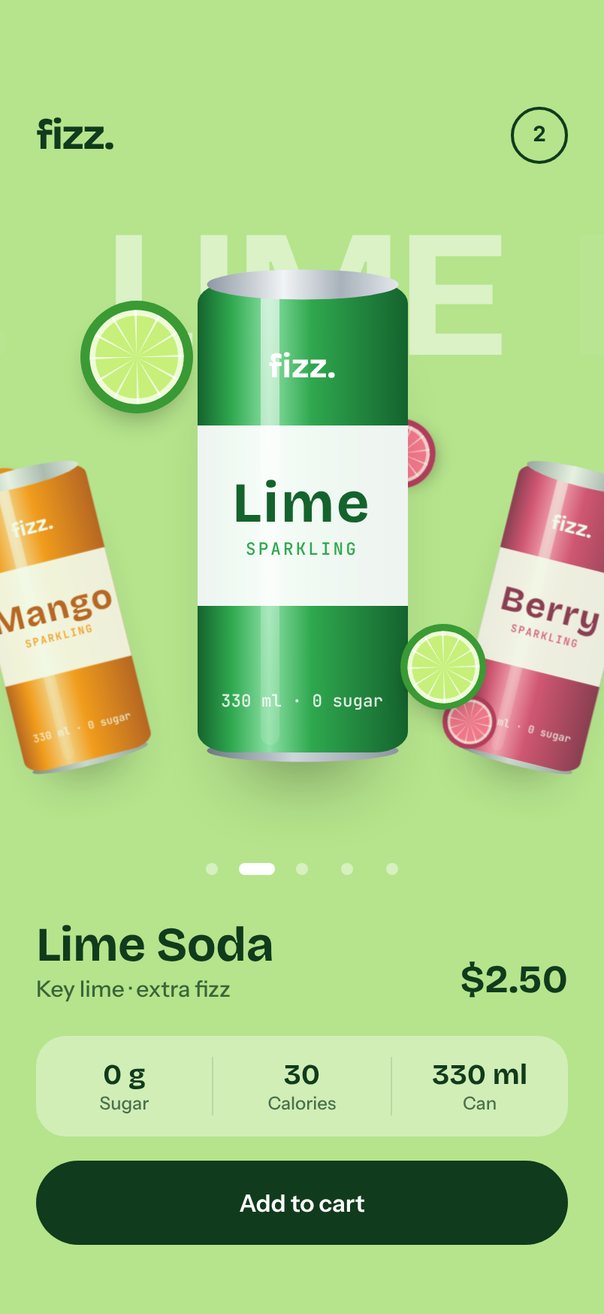
Live demo. Drag it, tap it.
How it works
itemAnimationspaces the cans 40% of the screen width apart (itemSizeis half the width), tilting neighbors14°, scaling them to0.62and fading the next ones out.- The carousel writes
progressevery frame;interpolateColorblends the background and ink between the current and next flavor, and the flavor words slide0.9screen widths per item. - Each can's two fruit slices read
relativeProgressand drift and spin against the motion, whileonSnapToItemswaps the name, note and calories.
Uses
Full source
import * as React from "react";
import { Pressable, StyleSheet, Text, View } from "react-native";
import Animated, {
	Easing,
	Extrapolation,
	interpolate,
	interpolateColor,
	type SharedValue,
	useAnimatedStyle,
	useSharedValue,
	withTiming,
} from "react-native-reanimated";
import {
	Carousel,
	type CarouselItemAnimation,
	type CarouselRenderItem,
	Pagination,
} from "react-native-reanimated-carousel";
import Svg, {
	Circle,
	Defs,
	Ellipse,
	LinearGradient,
	Path,
	Rect,
	Stop,
} from "react-native-svg";

import { SceneScreen, useScene } from "@/features/scenes/kit";

// Colors in order: background, ink, can, can shade, can highlight, fruit, rind.
const FLAVORS = [
	flavor(
		"Mango",
		"MANGO",
		"Alphonso mango · light fizz",
		45,
		"#FFC145 #4A2300 #FF8A00 #B54708 #FFD08A #FFB000 #E97A00",
	),
	flavor(
		"Lime",
		"LIME",
		"Key lime · extra fizz",
		30,
		"#B5E48C #103B1C #2FA84F #14632D #8BE0A4 #C6F07A #3A9A34",
	),
	flavor(
		"Berry",
		"BERRY",
		"Raspberry & blackcurrant",
		40,
		"#FF9EBB #4A0B26 #D6336C #7E1442 #FF8FB6 #FF5C8A #B0144E",
	),
	flavor(
		"Citrus",
		"BLUE CITRUS",
		"Blue citrus · pinch of sea salt",
		35,
		"#8FD3FF #0B1F4D #2563EB #1E3A8A #7FB0FF #FFD166 #F28C28",
	),
	flavor(
		"Grape",
		"GRAPE",
		"Kyoho grape · lightly sweet",
		50,
		"#CDB4FF #2A0F57 #7C3AED #4C1D95 #B794F6 #A855F7 #6B21A8",
	),
];

function flavor(
	name: string,
	word: string,
	note: string,
	kcal: number,
	colors: string,
) {
	const [bg, ink, can, shade, highlight, fruit, rind] = colors.split(" ");
	return {
		name,
		word,
		note,
		kcal,
		bg,
		ink,
		can,
		shade,
		highlight,
		fruit,
		rind,
	};
}

type Flavor = ReturnType<typeof flavor>;

const N = FLAVORS.length;
const BG = FLAVORS.map((f) => f.bg);
const INK = FLAVORS.map((f) => f.ink);
const START = 1; // open on Lime

// Twelve thin pith wedges of a citrus slice, on a 60 x 60 grid.
const WEDGES = Array.from({ length: 12 }, (_, k) => {
	const at = (deg: number) => {
		const a = (deg * Math.PI) / 180;
		return `${(30 + 25 * Math.sin(a)).toFixed(2)} ${(30 - 25 * Math.cos(a)).toFixed(2)}`;
	};
	return `M30 30L${at(k * 30 + 27)}L${at(k * 30 + 30)}Z`;
}).join("");

// Colour that follows a looping progress through one colour per flavor.
function loopColor(p: number, colors: string[]) {
	"worklet";
	const i = Math.floor(p);
	const a = ((i % N) + N) % N;
	return interpolateColor(p - i, [0, 1], [colors[a], colors[(a + 1) % N]]);
}

export default function Scene() {
	return (
		<SceneScreen
			background={FLAVORS[START].bg}
			statusBar="dark"
			fonts={[
				"Bricolage-Bold",
				"Instrument-Medium",
				"Instrument-SemiBold",
				"JetBrainsMono-Medium",
			]}
		>
			<FlavorSwitcher />
		</SceneScreen>
	);
}

function FlavorSwitcher() {
	const { width, height, insets } = useScene();
	// The hero follows the width, but only takes what the header and buy box leave.
	const k = Math.min(
		width / 402,
		(height - insets.top - insets.bottom - 370) / 408,
	);
	const canWidth = 140 * k;
	const canHeight = canWidth * (250 / 112);
	const canTop = 0.06 * canHeight; // the rest is room for the shadow and the tilted neighbors
	const heroHeight = canHeight * 1.28;
	const itemSize = width * 0.5;
	const spacing = width * 0.4;
	// The flavor word sits on the lid and pokes out above the carousel.
	const wordLine = 0.36 * width;
	const wordTop = canTop + 0.03 * canHeight - wordLine / 2;

	const progress = useSharedValue(START);
	const [index, setIndex] = React.useState(START);
	const [inCart, setInCart] = React.useState(2);
	const flavor = FLAVORS[index];

	const itemAnimation = React.useCallback<CarouselItemAnimation>(
		(value) => {
			"worklet";
			const d = Math.abs(value);
			return {
				transform: [
					{ translateX: value * spacing + (width - itemSize) / 2 },
					{ translateY: interpolate(d, [0, 1], [0, 0.4 * canWidth]) },
					{ rotateZ: `${value * 14}deg` },
					{ scale: interpolate(d, [0, 1, 2], [1, 0.62, 0.45]) },
				],
				opacity: interpolate(d, [0, 1, 2], [1, 0.8, 0], Extrapolation.CLAMP),
				zIndex: Math.round(100 - d * 10),
			};
		},
		[width, itemSize, spacing, canWidth],
	);

	const renderItem = React.useCallback<CarouselRenderItem<Flavor>>(
		({ item, relativeProgress }) => (
			<CanSlide
				flavor={item}
				size={canWidth}
				top={canTop}
				progress={relativeProgress}
			/>
		),
		[canWidth, canTop],
	);

	// Screen colours follow the drag continuously, not only after a snap.
	const background = useAnimatedStyle(() => ({
		backgroundColor: loopColor(progress.value, BG),
	}));
	const ink = useAnimatedStyle(() => ({
		color: loopColor(progress.value, INK),
	}));
	const inkBorder = useAnimatedStyle(() => ({
		borderColor: loopColor(progress.value, INK),
	}));
	const inkFill = useAnimatedStyle(() => ({
		backgroundColor: loopColor(progress.value, INK),
	}));
	const swap = useSwapIn(index);

	const facts = [
		["0 g", "Sugar"],
		[`${flavor.kcal}`, "Calories"],
		["330 ml", "Can"],
	];

	return (
		<Animated.View style={[styles.fill, background]}>
			<View
				style={[
					styles.fill,
					{ paddingTop: insets.top, paddingBottom: insets.bottom + 12 },
				]}
			>
				<View style={styles.topBar}>
					<Animated.Text style={[styles.logo, ink]}>fizz.</Animated.Text>
					<Animated.View style={[styles.cart, inkBorder]}>
						<Animated.Text style={[styles.cartCount, ink]}>
							{inCart}
						</Animated.Text>
					</Animated.View>
				</View>

				<View style={[styles.hero, { paddingTop: Math.max(0, -wordTop) / 2 }]}>
					<View style={{ height: heroHeight }}>
						<View style={[styles.words, { top: wordTop, height: wordLine }]}>
							{FLAVORS.map((f, i) => (
								<FlavorWord
									key={f.name}
									index={i}
									word={f.word}
									width={width}
									progress={progress}
								/>
							))}
						</View>
						<Carousel
							loop
							autoplay
							autoplayInterval={2600}
							defaultIndex={START}
							data={FLAVORS}
							style={{ width, height: heroHeight }}
							itemSize={itemSize}
							itemAnimation={itemAnimation}
							animation={{
								type: "timing",
								duration: 700,
								easing: Easing.out(Easing.poly(4)),
							}}
							progress={progress}
							onSnapToItem={setIndex}
							renderItem={renderItem}
						/>
					</View>
					<Pagination
						count={N}
						progress={progress}
						containerStyle={styles.dots}
						dotStyle={{ width: 8, height: 8, backgroundColor: "#FFFFFF73" }}
						activeDotStyle={{ width: 24, backgroundColor: "#FFFFFF" }}
					/>
				</View>

				<View style={styles.info}>
					<Animated.View style={[styles.fill, swap]}>
						<Animated.Text style={[styles.name, ink]}>
							{flavor.name} Soda
						</Animated.Text>
						<Animated.Text style={[styles.note, ink]}>
							{flavor.note}
						</Animated.Text>
					</Animated.View>
					<Animated.Text style={[styles.price, ink]}>$2.50</Animated.Text>
				</View>

				<View style={styles.facts}>
					{facts.map(([value, label], i) => (
						<View key={label} style={[styles.fact, i > 0 && styles.factRule]}>
							<Animated.Text style={[styles.factValue, ink, i === 1 && swap]}>
								{value}
							</Animated.Text>
							<Animated.Text style={[styles.factLabel, ink]}>
								{label}
							</Animated.Text>
						</View>
					))}
				</View>

				<Pressable
					style={styles.addPress}
					onPress={() => setInCart((n) => n + 1)}
				>
					<Animated.View style={[styles.add, inkFill]}>
						<Text style={styles.addLabel}>Add to cart</Text>
					</Animated.View>
				</Pressable>
			</View>
		</Animated.View>
	);
}

// Fades new text in with a short rise whenever `key` changes (not on mount).
function useSwapIn(key: number) {
	const t = useSharedValue(1);
	const shown = React.useRef(key);
	React.useEffect(() => {
		if (shown.current === key) return;
		shown.current = key;
		t.value = 0;
		t.value = withTiming(1, {
			duration: 350,
			easing: Easing.out(Easing.cubic),
		});
	}, [key, t]);
	return useAnimatedStyle(() => ({
		opacity: t.value,
		transform: [{ translateY: (1 - t.value) * 6 }],
	}));
}

// The big flavor word behind the cans slides 0.9 screen widths per item.
function FlavorWord(props: {
	index: number;
	word: string;
	width: number;
	progress: SharedValue<number>;
}) {
	const { index, word, width, progress } = props;
	const size = Math.min(0.3 * width, (1.77 * width) / word.length);
	const style = useAnimatedStyle(() => {
		const rel = ((((index - progress.value + N / 2) % N) + N) % N) - N / 2;
		return {
			opacity: Math.max(0, 1 - Math.abs(rel) * 0.9),
			transform: [{ translateX: rel * width * 0.9 }],
		};
	});
	const type = {
		fontSize: size,
		lineHeight: 0.36 * width,
		letterSpacing: -0.04 * size,
	};
	return (
		<Animated.Text numberOfLines={1} style={[styles.word, type, style]}>
			{word}
		</Animated.Text>
	);
}

// One carousel item: the can between two fruit slices that drift against the motion.
const CanSlide = React.memo(function CanSlide(props: {
	flavor: Flavor;
	size: number;
	top: number;
	progress: SharedValue<number>;
}) {
	const { flavor, size, top, progress } = props;
	const c = size / 112; // the can is drawn on a 112 x 250 grid
	return (
		<View style={[styles.slide, { paddingTop: top }]}>
			<View style={{ width: size, height: 250 * c }}>
				<Drift
					progress={progress}
					c={c}
					x={-62}
					y={9}
					size={60}
					dx={-70}
					dy={-20}
					spin={-80}
				>
					<FruitSlice flavor={flavor} />
				</Drift>
				<Can flavor={flavor} c={c} />
				<Drift
					progress={progress}
					c={c}
					x={108}
					y={181}
					size={46}
					dx={-120}
					dy={24}
					spin={120}
				>
					<FruitSlice flavor={flavor} />
				</Drift>
			</View>
		</View>
	);
});

// Places a child on the can grid and moves it by relativeProgress: dx and spin per item,
// dy by distance from the center.
function Drift(props: {
	progress: SharedValue<number>;
	c: number;
	x: number;
	y: number;
	size: number;
	dx: number;
	dy: number;
	spin: number;
	children: React.ReactNode;
}) {
	const { progress, c, x, y, size, dx, dy, spin, children } = props;
	const style = useAnimatedStyle(() => {
		const v = progress.value;
		return {
			transform: [
				{ translateX: v * dx * c },
				{ translateY: Math.abs(v) * dy * c },
				{ rotateZ: `${v * spin}deg` },
			],
		};
	});
	const box = { left: x * c, top: y * c, width: size * c, height: size * c };
	return (
		<Animated.View style={[styles.abs, box, style]}>{children}</Animated.View>
	);
}

function Can({ flavor, c }: { flavor: Flavor; c: number }) {
	const body = `can-body-${flavor.name}`;
	const shadow = `0px ${34 * c}px ${40 * c}px ${-22 * c}px #00000073`;
	const font = (size: number, line: number) => ({
		fontSize: size * c,
		lineHeight: line * c,
	});
	return (
		<>
			<View
				style={[styles.canShadow, { borderRadius: 16 * c, boxShadow: shadow }]}
			/>
			<Svg
				style={[styles.abs, { top: -8 * c }]}
				width={112 * c}
				height={264 * c}
				viewBox="0 -8 112 264"
			>
				<Defs>
					<Gradient
						id={body}
						colors={[
							flavor.shade,
							flavor.can,
							flavor.highlight,
							flavor.can,
							flavor.shade,
						]}
						stops={[0, 0.16, 0.34, 0.54, 1]}
					/>
					<Gradient
						id="can-lid"
						colors={["#8E98A3", "#F1F4F6", "#A8B1BA", "#E4E8EC"]}
						stops={[0, 0.4, 0.7, 1]}
					/>
					<Gradient
						id="can-base"
						colors={["#6E7882", "#CED5DB", "#8C959E"]}
						stops={[0, 0.45, 1]}
					/>
					<Gradient
						id="can-shine"
						colors={["#FFFFFF99", "#FFFFFF1F"]}
						stops={[0, 1]}
						vertical
					/>
				</Defs>
				<Ellipse cx={56} cy={249} rx={51} ry={6} fill="url(#can-base)" />
				<Rect width={112} height={250} rx={18} ry={11} fill={`url(#${body})`} />
				<Rect
					x={33.6}
					y={4}
					width={10}
					height={242}
					rx={5}
					fill="url(#can-shine)"
				/>
				<Rect y={76} width={112} height={96} fill="#FFFFFFED" />
				<Ellipse cx={56} cy={1} rx={51} ry={8} fill="url(#can-lid)" />
			</Svg>
			<Text
				style={[styles.canText, styles.canBrand, font(18, 20), { top: 34 * c }]}
			>
				fizz.
			</Text>
			<View style={[styles.canBand, { top: 76 * c, height: 96 * c }]}>
				<Text
					style={[
						styles.canName,
						font(30, 34),
						{ color: flavor.shade, letterSpacing: 1.2 * c },
					]}
				>
					{flavor.name}
				</Text>
				<Text
					style={[
						styles.canMono,
						font(9, 11),
						{ color: flavor.can, letterSpacing: 1.26 * c },
					]}
				>
					SPARKLING
				</Text>
			</View>
			<Text
				style={[
					styles.canText,
					styles.canMono,
					styles.canMl,
					font(9, 11),
					{ bottom: 22 * c },
				]}
			>
				330 ml · 0 sugar
			</Text>
		</>
	);
}

// SVG linear gradient, left to right unless `vertical`.
function Gradient(props: {
	id: string;
	colors: string[];
	stops: number[];
	vertical?: boolean;
}) {
	const { id, colors, stops, vertical } = props;
	return (
		<LinearGradient
			id={id}
			x1="0"
			y1="0"
			x2={vertical ? "0" : "1"}
			y2={vertical ? "1" : "0"}
		>
			{colors.map((color, i) => (
				<Stop key={stops[i]} offset={stops[i]} stopColor={color} />
			))}
		</LinearGradient>
	);
}

// A citrus slice: rind, flesh, pith wedges and a pale inner ring.
function FruitSlice({ flavor }: { flavor: Flavor }) {
	return (
		<View style={[styles.slice, { backgroundColor: flavor.rind }]}>
			<Svg width="100%" height="100%" viewBox="0 0 60 60">
				<Circle cx={30} cy={30} r={25} fill={flavor.fruit} />
				<Path d={WEDGES} fill="#FFFFFFBF" />
				<Circle
					cx={30}
					cy={30}
					r={23.5}
					fill="none"
					stroke="#FFFFFFB3"
					strokeWidth={3}
				/>
			</Svg>
		</View>
	);
}

const styles = StyleSheet.create({
	fill: { flex: 1 },
	abs: { position: "absolute", left: 0, top: 0 },
	topBar: {
		height: 56,
		paddingHorizontal: 24,
		flexDirection: "row",
		alignItems: "center",
		justifyContent: "space-between",
	},
	logo: {
		fontFamily: "Bricolage-Bold",
		fontSize: 28,
		lineHeight: 32,
		letterSpacing: -0.84,
	},
	cart: {
		width: 38,
		height: 38,
		borderRadius: 19,
		borderWidth: 2,
		alignItems: "center",
		justifyContent: "center",
	},
	cartCount: { fontSize: 14, fontWeight: "700", lineHeight: 16 },
	hero: { flex: 1, justifyContent: "center" },
	words: { position: "absolute", left: 0, right: 0, pointerEvents: "none" },
	word: {
		position: "absolute",
		left: 0,
		right: 0,
		textAlign: "center",
		fontFamily: "Bricolage-Bold",
		color: "#FFFFFF80",
		includeFontPadding: false,
	},
	dots: { alignSelf: "center", gap: 6, marginTop: 4 },
	slide: { flex: 1, alignItems: "center" },
	canShadow: {
		position: "absolute",
		top: 6,
		right: 6,
		bottom: 6,
		left: 6,
		backgroundColor: "#000",
	},
	canText: { position: "absolute", left: 0, right: 0, textAlign: "center" },
	canBrand: { fontFamily: "Bricolage-Bold", color: "#FFFFFF" },
	canBand: {
		position: "absolute",
		left: 0,
		right: 0,
		alignItems: "center",
		justifyContent: "center",
	},
	canName: { fontFamily: "Bricolage-Bold", includeFontPadding: false },
	canMono: { fontFamily: "JetBrainsMono-Medium", marginTop: 2 },
	canMl: { color: "#FFFFFFD9" },
	slice: {
		flex: 1,
		borderRadius: 999,
		boxShadow: "0px 10px 18px -8px #00000059",
	},
	info: {
		paddingHorizontal: 24,
		flexDirection: "row",
		alignItems: "flex-end",
		gap: 12,
	},
	name: {
		fontFamily: "Bricolage-Bold",
		fontSize: 32,
		lineHeight: 36,
		letterSpacing: -0.3,
	},
	note: {
		fontFamily: "Instrument-Medium",
		fontSize: 15,
		lineHeight: 22,
		opacity: 0.75,
	},
	price: {
		fontFamily: "Bricolage-Bold",
		fontSize: 26,
		lineHeight: 30,
		marginBottom: 2,
	},
	facts: {
		marginTop: 20,
		marginHorizontal: 24,
		paddingVertical: 14,
		borderRadius: 20,
		backgroundColor: "#FFFFFF61",
		flexDirection: "row",
	},
	fact: { flex: 1, alignItems: "center" },
	factRule: { borderLeftWidth: 1, borderLeftColor: "#0000001A" },
	factValue: { fontFamily: "Bricolage-Bold", fontSize: 19, lineHeight: 23 },
	factLabel: {
		fontFamily: "Instrument-Medium",
		fontSize: 12,
		lineHeight: 16,
		opacity: 0.7,
	},
	addPress: { marginTop: 16, marginHorizontal: 24 },
	add: {
		height: 56,
		borderRadius: 28,
		alignItems: "center",
		justifyContent: "center",
	},
	addLabel: {
		fontFamily: "Instrument-SemiBold",
		fontSize: 16,
		lineHeight: 20,
		color: "#FFFFFF",
	},
});