Rolling Clock
A clock app where each of the six digits is its own vertical carousel, rolling forward every second, with a 12/24-hour switch and an alarms list.
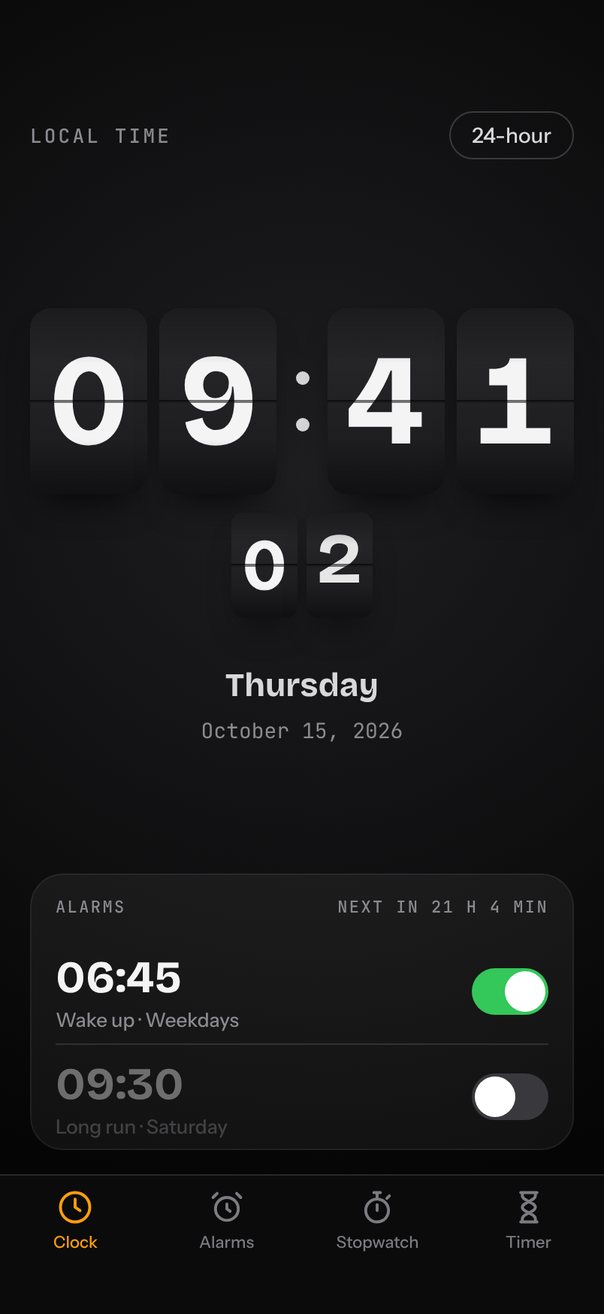
Live demo. Drag it, tap it.
How it works
- Six vertical
loopcarousels hold 3, 10, 6, 10, 6 and 10 digits, withscrollEnabled={false}because the clock moves them, not your finger. - Each change calls
next({ count })with the forward distance fromgetCurrentIndex(), so 9 rolls on to 0 and 23 to 00 without turning back. animationis a 650 ms timing on an overshooting bezier (0.34, 1.56, 0.64, 1), anditemAnimationmoves each digit one tile while it shrinks to 0.6 and fades.
Uses
Full source
import { SceneScreen, useScene } from "@/features/scenes/kit";
import { LinearGradient } from "expo-linear-gradient";
import * as React from "react";
import { Pressable, StyleSheet, Text, View } from "react-native";
import Animated, {
	Easing,
	interpolate,
	interpolateColor,
	useAnimatedStyle,
	useDerivedValue,
	withTiming,
} from "react-native-reanimated";
import {
	Carousel,
	type CarouselItemAnimation,
	type CarouselRef,
} from "react-native-reanimated-carousel";
import Svg, { Defs, Path, RadialGradient, Rect, Stop } from "react-native-svg";

// One looping column per digit: tens of hours, hours, tens of minutes, minutes, and seconds.
const COLUMNS = [3, 10, 6, 10, 6, 10].map((n) =>
	Array.from({ length: n }, (_, i) => i),
);
const ROLL = {
	type: "timing",
	duration: 650,
	easing: Easing.bezier(0.34, 1.56, 0.64, 1),
} as const;

// Repeat days use Date#getDay(): 0 is Sunday.
const ALARMS = [
	{
		h: 6,
		m: 45,
		label: "Wake up",
		days: "Weekdays",
		repeat: [1, 2, 3, 4, 5],
		on: true,
	},
	{ h: 9, m: 30, label: "Long run", days: "Saturday", repeat: [6], on: false },
];
type Alarm = (typeof ALARMS)[number];

const TABS = [
	{ label: "Clock", d: "M21 12a9 9 0 1 1-18 0a9 9 0 1 1 18 0M12 7v5l3 2" },
	{
		label: "Alarms",
		d: "M19 13a7 7 0 1 1-14 0a7 7 0 1 1 14 0M12 10v3l2 1.5M3.5 6 6 3.5M20.5 6 18 3.5",
	},
	{
		label: "Stopwatch",
		d: "M19 14a7 7 0 1 1-14 0a7 7 0 1 1 14 0M12 14v-3.5M10 3h4M12 3v4M18 6.5l1.5-1.5",
	},
	{
		label: "Timer",
		d: "M7 3h10M7 21h10M8 3v2c0 3 8 4 8 7s-8 4-8 7v2M16 3v2c0 3-8 4-8 7s8 4 8 7v2",
	},
];

const FG = "#F4F4F5";
const DIM = "#8A8A8F";
const ACCENT = "#FF9F0A";

const mod = (n: number, m: number) => ((n % m) + m) % m;
const pad = (n: number) => String(n).padStart(2, "0");

function digitsOf(date: Date, h12: boolean) {
	const h = h12 ? date.getHours() % 12 || 12 : date.getHours();
	const m = date.getMinutes();
	const s = date.getSeconds();
	return [
		Math.floor(h / 10),
		h % 10,
		Math.floor(m / 10),
		m % 10,
		Math.floor(s / 10),
		s % 10,
	];
}

function formatAlarm(h: number, m: number, h12: boolean) {
	if (!h12) return { time: `${pad(h)}:${pad(m)}`, suffix: "" };
	return { time: `${h % 12 || 12}:${pad(m)}`, suffix: h < 12 ? " AM" : " PM" };
}

// Minutes until the alarm next rings, looking up to a week ahead.
function minutesUntil(alarm: Alarm, now: Date) {
	const since = now.getHours() * 60 + now.getMinutes();
	for (let day = 0; day < 8; day++) {
		const wait = day * 1440 + alarm.h * 60 + alarm.m - since;
		if (wait > 0 && alarm.repeat.includes((now.getDay() + day) % 7))
			return wait;
	}
	return Number.POSITIVE_INFINITY;
}

function formatWait(min: number) {
	if (!Number.isFinite(min)) return "ALL OFF";
	const d = Math.floor(min / 1440);
	const h = Math.floor((min % 1440) / 60);
	return d ? `NEXT IN ${d} D ${h} H` : `NEXT IN ${h} H ${min % 60} MIN`;
}

export default function Scene() {
	return (
		<SceneScreen
			background="#050505"
			statusBar="light"
			fonts={[
				"Bricolage-Bold",
				"Instrument-Medium",
				"Instrument-SemiBold",
				"JetBrainsMono-Regular",
				"JetBrainsMono-Medium",
			]}
		>
			<Clock />
		</SceneScreen>
	);
}

function Clock() {
	const { width, height, insets } = useScene();
	const s = width / 402;
	const [h12, setH12] = React.useState(false);
	const [now, setNow] = React.useState(() => new Date());

	// Poll five times a second, but re-render only when the second changes.
	React.useEffect(() => {
		const id = setInterval(() => {
			const d = new Date();
			setNow((prev) => (prev.getSeconds() === d.getSeconds() ? prev : d));
		}, 200);
		return () => clearInterval(id);
	}, []);

	const digits = digitsOf(now, h12);
	const big = { w: Math.round(78 * s), h: Math.round(124 * s) };
	const small = { w: Math.round(44 * s), h: Math.round(70 * s) };
	const tile = (i: number, size: Size) => (
		<Digit value={digits[i]} data={COLUMNS[i]} size={size} />
	);
	const meridiem = now.getHours() < 12 ? "AM" : "PM";

	return (
		<View style={StyleSheet.absoluteFill}>
			<Backdrop width={width} height={height} />
			<View style={[styles.screen, { paddingTop: insets.top }]}>
				<View style={styles.topBar}>
					<Text style={styles.kicker}>LOCAL TIME</Text>
					<Pressable
						onPress={() => setH12((v) => !v)}
						style={styles.mode}
						hitSlop={8}
					>
						<Text style={styles.modeText}>{h12 ? "12-hour" : "24-hour"}</Text>
					</Pressable>
				</View>

				<View style={styles.hero}>
					<View style={styles.row}>
						{tile(0, big)}
						{tile(1, big)}
						<Colon height={big.h} s={s} />
						{tile(2, big)}
						{tile(3, big)}
					</View>
					<View style={[styles.row, styles.seconds]}>
						{tile(4, small)}
						{tile(5, small)}
					</View>
					<Text style={[styles.weekday, { fontSize: 22 * s }]}>
						{now.toLocaleDateString("en-US", { weekday: "long" })}
					</Text>
					<Text style={[styles.day, { fontSize: 14 * s }]}>
						{now.toLocaleDateString("en-US", {
							month: "long",
							day: "numeric",
							year: "numeric",
						})}
						{h12 ? ` · ${meridiem}` : ""}
					</Text>
				</View>

				<Alarms now={now} h12={h12} />
			</View>
			<TabBar bottom={insets.bottom} />
		</View>
	);
}

function Backdrop({ width, height }: { width: number; height: number }) {
	return (
		<Svg width={width} height={height} style={StyleSheet.absoluteFill}>
			<Defs>
				<RadialGradient
					id="clock-bg"
					cx={width / 2}
					cy={height * 0.36}
					r={height * 0.55}
					gradientUnits="userSpaceOnUse"
				>
					<Stop offset="0" stopColor="#1E1E21" />
					<Stop offset="1" stopColor="#050505" />
				</RadialGradient>
			</Defs>
			<Rect width={width} height={height} fill="url(#clock-bg)" />
		</Svg>
	);
}

type Size = { w: number; h: number };

function Digit({
	value,
	data,
	size,
}: {
	value: number;
	data: number[];
	size: Size;
}) {
	const count = data.length;
	const ref = React.useRef<CarouselRef>(null);
	const [first] = React.useState(value);

	// Always roll forward: 9 → 0 is one step, 23 → 00 rolls the tens 2 → 0 in one step too.
	React.useEffect(() => {
		const steps = mod(value - (ref.current?.getCurrentIndex() ?? first), count);
		if (steps > 0) ref.current?.next({ count: steps });
	}, [value, count, first]);

	// The leaving digit slides up and shrinks while the next one rises in from below.
	const itemAnimation = React.useCallback<CarouselItemAnimation>(
		(v) => {
			"worklet";
			const d = Math.abs(v);
			return {
				transform: [
					{ translateY: v * size.h },
					{ scale: interpolate(d, [0, 1], [1, 0.6], "clamp") },
				],
				opacity: interpolate(d, [0, 1], [1, 0], "clamp"),
			};
		},
		[size.h],
	);

	const renderItem = React.useCallback(
		({ item }: { item: number }) => (
			<View style={styles.cell}>
				<Text
					style={[styles.digit, { fontSize: size.w * 1.1, lineHeight: size.h }]}
				>
					{item}
				</Text>
			</View>
		),
		[size.w, size.h],
	);

	return (
		<View
			style={[
				styles.tile,
				{ width: size.w, height: size.h, borderRadius: size.w * 0.18 },
			]}
		>
			<LinearGradient
				colors={["#2A2A2D", "#19191B"]}
				style={StyleSheet.absoluteFill}
			/>
			<Carousel
				ref={ref}
				orientation="vertical"
				loop
				scrollEnabled={false}
				data={data}
				defaultIndex={first}
				style={{ width: size.w, height: size.h }}
				animation={ROLL}
				itemAnimation={itemAnimation}
				renderItem={renderItem}
			/>
			<LinearGradient
				colors={[
					"rgba(0,0,0,0.35)",
					"transparent",
					"transparent",
					"rgba(0,0,0,0.35)",
				]}
				locations={[0, 0.3, 0.7, 1]}
				style={[StyleSheet.absoluteFill, styles.passThrough]}
			/>
			<View style={styles.split} />
		</View>
	);
}

function Colon({ height, s }: { height: number; s: number }) {
	const dot = { width: 9 * s, height: 9 * s, borderRadius: 5 * s };
	return (
		<View style={[styles.colon, { height, gap: 22 * s }]}>
			<View style={[styles.dot, dot]} />
			<View style={[styles.dot, dot]} />
		</View>
	);
}

function Alarms({ now, h12 }: { now: Date; h12: boolean }) {
	const [on, setOn] = React.useState(ALARMS.map((a) => a.on));
	const next = Math.min(
		...ALARMS.filter((_, i) => on[i]).map((a) => minutesUntil(a, now)),
	);
	return (
		<View style={styles.alarms}>
			<View style={styles.alarmsHead}>
				<Text style={styles.sectionLabel}>ALARMS</Text>
				<Text style={styles.sectionLabel}>{formatWait(next)}</Text>
			</View>
			{ALARMS.map((a, i) => {
				const t = formatAlarm(a.h, a.m, h12);
				return (
					<View key={a.label} style={[styles.alarm, i > 0 && styles.divider]}>
						<View style={[styles.alarmText, !on[i] && styles.off]}>
							<Text style={styles.alarmTime}>
								{t.time}
								<Text style={styles.alarmSuffix}>{t.suffix}</Text>
							</Text>
							<Text style={styles.alarmLabel}>
								{a.label} · {a.days}
							</Text>
						</View>
						<Toggle
							value={on[i]}
							onPress={() => setOn((v) => v.map((x, k) => (k === i ? !x : x)))}
						/>
					</View>
				);
			})}
		</View>
	);
}

function Toggle({ value, onPress }: { value: boolean; onPress: () => void }) {
	const t = useDerivedValue(() => withTiming(value ? 1 : 0, { duration: 200 }));
	const track = useAnimatedStyle(() => ({
		backgroundColor: interpolateColor(t.value, [0, 1], ["#39393D", "#34C759"]),
	}));
	const knob = useAnimatedStyle(() => ({
		transform: [{ translateX: 2 + t.value * 20 }],
	}));
	return (
		<Pressable
			onPress={onPress}
			hitSlop={8}
			accessibilityRole="switch"
			accessibilityState={{ checked: value }}
		>
			<Animated.View style={[styles.track, track]}>
				<Animated.View style={[styles.knob, knob]} />
			</Animated.View>
		</Pressable>
	);
}

function TabBar({ bottom }: { bottom: number }) {
	return (
		<View style={[styles.tabBar, { paddingBottom: bottom }]}>
			{TABS.map((tab, i) => {
				const color = i === 0 ? ACCENT : "#7C7C80";
				return (
					<View key={tab.label} style={styles.tab}>
						<Svg width={26} height={26} viewBox="0 0 24 24">
							<Path
								d={tab.d}
								stroke={color}
								strokeWidth={1.8}
								fill="none"
								strokeLinecap="round"
								strokeLinejoin="round"
							/>
						</Svg>
						<Text style={[styles.tabLabel, { color }]}>{tab.label}</Text>
					</View>
				);
			})}
		</View>
	);
}

const styles = StyleSheet.create({
	screen: { flex: 1, paddingHorizontal: 20 },
	topBar: {
		height: 56,
		flexDirection: "row",
		alignItems: "center",
		justifyContent: "space-between",
	},
	kicker: {
		fontFamily: "JetBrainsMono-Medium",
		fontSize: 13,
		color: DIM,
		letterSpacing: 1.6,
	},
	mode: {
		height: 32,
		paddingHorizontal: 14,
		borderRadius: 16,
		borderWidth: 1,
		borderColor: "#3A3A3D",
		justifyContent: "center",
	},
	modeText: { fontFamily: "Instrument-Medium", fontSize: 14, color: "#D8D8DC" },
	hero: { flex: 1, alignItems: "center", justifyContent: "center" },
	row: { flexDirection: "row", alignItems: "center", gap: 8 },
	seconds: { marginTop: 12, marginBottom: 32, gap: 6 },
	tile: {
		overflow: "hidden",
		boxShadow:
			"inset 0px 1px 0px rgba(255,255,255,0.08), 0px 14px 24px -12px rgba(0,0,0,0.8)",
	},
	cell: { flex: 1, alignItems: "center", justifyContent: "center" },
	digit: {
		fontFamily: "Bricolage-Bold",
		color: FG,
		textAlign: "center",
		fontVariant: ["tabular-nums"],
		includeFontPadding: false,
	},
	passThrough: { pointerEvents: "none" },
	split: {
		position: "absolute",
		left: 0,
		right: 0,
		top: "50%",
		height: 2,
		marginTop: -1,
		backgroundColor: "rgba(0,0,0,0.55)",
		borderBottomWidth: 1,
		borderBottomColor: "rgba(255,255,255,0.05)",
	},
	colon: { width: 18, alignItems: "center", justifyContent: "center" },
	dot: { backgroundColor: FG, opacity: 0.85 },
	weekday: { fontFamily: "Bricolage-Bold", color: "#D8D8DC" },
	day: { fontFamily: "JetBrainsMono-Regular", color: DIM, marginTop: 8 },
	alarms: {
		marginBottom: 16,
		borderRadius: 22,
		backgroundColor: "rgba(255,255,255,0.05)",
		borderWidth: 1,
		borderColor: "rgba(255,255,255,0.06)",
		paddingHorizontal: 16,
	},
	alarmsHead: {
		height: 42,
		flexDirection: "row",
		alignItems: "center",
		justifyContent: "space-between",
	},
	sectionLabel: {
		fontFamily: "JetBrainsMono-Medium",
		fontSize: 11,
		letterSpacing: 1.2,
		color: DIM,
	},
	alarm: { height: 70, flexDirection: "row", alignItems: "center" },
	divider: {
		borderTopWidth: StyleSheet.hairlineWidth,
		borderTopColor: "rgba(255,255,255,0.12)",
	},
	alarmText: { flex: 1, gap: 2 },
	alarmTime: { fontFamily: "Bricolage-Bold", fontSize: 30, color: FG },
	alarmSuffix: { fontFamily: "Instrument-SemiBold", fontSize: 15 },
	off: { opacity: 0.4 },
	alarmLabel: { fontFamily: "Instrument-Medium", fontSize: 13, color: DIM },
	track: { width: 51, height: 31, borderRadius: 16, justifyContent: "center" },
	knob: { width: 27, height: 27, borderRadius: 14, backgroundColor: "#fff" },
	tabBar: {
		flexDirection: "row",
		paddingTop: 8,
		backgroundColor: "rgba(12,12,13,0.94)",
		borderTopWidth: StyleSheet.hairlineWidth,
		borderTopColor: "rgba(255,255,255,0.12)",
	},
	tab: { flex: 1, alignItems: "center", gap: 3, height: 50 },
	tabLabel: { fontFamily: "Instrument-Medium", fontSize: 11 },
});